
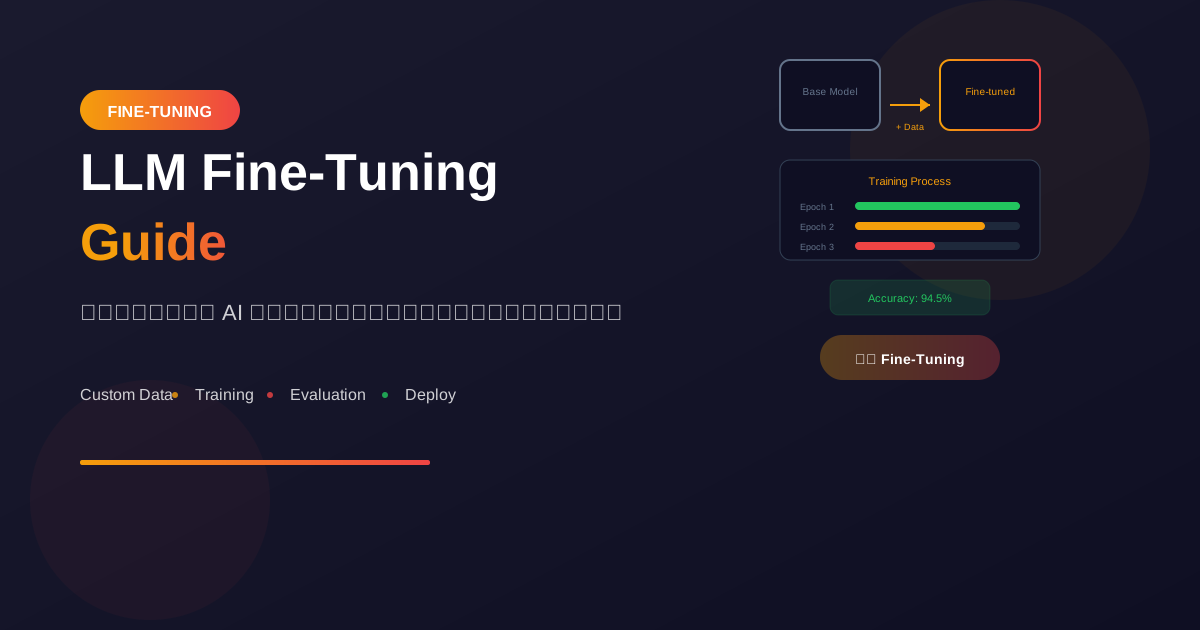
Fine-tuning คือการปรับแต่ง pre-trained model ให้เชี่ยวชาญในงานเฉพาะทาง ช่วยให้ได้ผลลัพธ์ที่ดีกว่า prompting ธรรมดา
Fine-Tuning คืออะไร?
Concept
Pre-trained Model = รู้ทั่วไป
Fine-tuned Model = รู้เฉพาะทาง

เหมือนกับ:
- แพทย์จบแล้ว = Pre-trained
- แพทย์เฉพาะทางหัวใจ = Fine-tuned
เมื่อไหร่ควร Fine-tune?
✅ ควร Fine-tune เมื่อ:
- ต้องการ output format เฉพาะ
- มี domain-specific knowledge
- ต้องการ consistent style/tone
- Prompting ไม่ได้ผลดีพอ
- ต้องการลด tokens/costs

❌ ไม่ควร Fine-tune เมื่อ:
- Prompting ได้ผลดีอยู่แล้ว
- ไม่มี training data เพียงพอ
- Task เปลี่ยนบ่อย
- Budget จำกัดมาก
Fine-tuning vs Alternatives
Prompting:
+ เร็ว, ไม่ต้อง train
+ ไม่ต้องมี data
- Limited by context length
- Inconsistent results

RAG:
+ ใช้ข้อมูลล่าสุด
+ ไม่ต้อง train
- ต้องมี retrieval system
- เพิ่ม latency

Fine-tuning:
+ Consistent, optimized
+ ลด tokens ได้
- ต้องมี training data
- ใช้เวลาและค่าใช้จ่าย
OpenAI Fine-Tuning
Prepare Training Data
# Format: JSONL with messages
# training_data.jsonl

{"messages": [
    {"role": "system", "content": "You are a customer service agent."},
    {"role": "user", "content": "I want to return my order"},
    {"role": "assistant", "content": "I'd be happy to help with your return..."}
]}
{"messages": [
    {"role": "system", "content": "You are a customer service agent."},
    {"role": "user", "content": "Where is my package?"},
    {"role": "assistant", "content": "Let me check your order status..."}
]}
Upload and Train
from openai import OpenAI

client = OpenAI()

# 1. Upload training file
file = client.files.create(
    file=open("training_data.jsonl", "rb"),
    purpose="fine-tune"
)

print(f"File ID: {file.id}")

# 2. Create fine-tuning job
job = client.fine_tuning.jobs.create(
    training_file=file.id,
    model="gpt-4o-mini-2024-07-18",
    hyperparameters={
        "n_epochs": 3,
        "batch_size": 1,
        "learning_rate_multiplier": 1.8
    }
)

print(f"Job ID: {job.id}")

# 3. Monitor progress
job = client.fine_tuning.jobs.retrieve(job.id)
print(f"Status: {job.status}")

# 4. List events
events = client.fine_tuning.jobs.list_events(
    fine_tuning_job_id=job.id,
    limit=10
)
for event in events.data:
    print(event.message)
Use Fine-tuned Model
# After training completes
response = client.chat.completions.create(
    model="ft:gpt-4o-mini-2024-07-18:my-org::job-id",
    messages=[
        {"role": "system", "content": "You are a customer service agent."},
        {"role": "user", "content": "I need help with my order"}
    ]
)

print(response.choices[0].message.content)
Data Preparation
Data Quality
ข้อมูลที่ดีสำหรับ Fine-tuning:

1. Diverse Examples
   - ครอบคลุม use cases ต่างๆ
   - มีทั้ง common และ edge cases

2. High Quality
   - ตรวจสอบความถูกต้อง
   - รูปแบบ consistent

3. Sufficient Quantity
   - อย่างน้อย 50-100 examples
   - ยิ่งมากยิ่งดี (แต่ต้องมีคุณภาพ)

4. Representative
   - ใกล้เคียงกับ production use
   - มี realistic inputs/outputs
Data Preparation Script
import json
from pathlib import Path

def prepare_training_data(examples, system_prompt, output_file):
    """Prepare training data in JSONL format."""

    training_data = []

    for example in examples:
        training_data.append({
            "messages": [
                {"role": "system", "content": system_prompt},
                {"role": "user", "content": example["input"]},
                {"role": "assistant", "content": example["output"]}
            ]
        })

    # Write to JSONL
    with open(output_file, 'w') as f:
        for item in training_data:
            f.write(json.dumps(item) + '\n')

    print(f"Created {len(training_data)} training examples")

# Example usage
examples = [
    {
        "input": "Summarize this article: [article text]",
        "output": "The article discusses..."
    },
    # ... more examples
]

prepare_training_data(
    examples,
    "You are a professional summarizer.",
    "training.jsonl"
)
Data Validation
import json
import tiktoken

def validate_training_data(file_path):
    """Validate training data file."""
    errors = []
    encoding = tiktoken.encoding_for_model("gpt-4o-mini")

    with open(file_path, 'r') as f:
        for i, line in enumerate(f, 1):
            try:
                data = json.loads(line)

                # Check structure
                if "messages" not in data:
                    errors.append(f"Line {i}: Missing 'messages'")
                    continue

                messages = data["messages"]

                # Check roles
                for msg in messages:
                    if msg["role"] not in ["system", "user", "assistant"]:
                        errors.append(f"Line {i}: Invalid role")

                # Check tokens
                total_tokens = sum(
                    len(encoding.encode(msg["content"]))
                    for msg in messages
                )
                if total_tokens > 4096:
                    errors.append(f"Line {i}: Too many tokens ({total_tokens})")

            except json.JSONDecodeError:
                errors.append(f"Line {i}: Invalid JSON")

    if errors:
        print("Validation errors:")
        for error in errors:
            print(f"  - {error}")
    else:
        print("Validation passed!")

    return len(errors) == 0
Hyperparameters
Key Parameters
job = client.fine_tuning.jobs.create(
    training_file=file.id,
    model="gpt-4o-mini-2024-07-18",
    hyperparameters={
        # Number of training epochs
        # More epochs = better learning, but risk overfitting
        "n_epochs": 3,

        # Batch size
        # Larger = faster but needs more memory
        "batch_size": 1,

        # Learning rate multiplier
        # Higher = faster learning, but may overshoot
        "learning_rate_multiplier": 1.8
    }
)
Choosing Parameters
n_epochs:
- Start with 3-4
- Increase if underfitting
- Decrease if overfitting

batch_size:
- Usually auto-selected
- 1-4 for small datasets
- 8-32 for large datasets

learning_rate_multiplier:
- Start with default (1.8)
- Decrease if loss is unstable
- Increase if learning too slow
Evaluation
Split Data
import random

def split_data(data, train_ratio=0.8):
    """Split data into train and validation sets."""
    random.shuffle(data)
    split_idx = int(len(data) * train_ratio)

    return {
        "train": data[:split_idx],
        "validation": data[split_idx:]
    }

# Use validation set to evaluate
Evaluate Model
def evaluate_model(model_id, test_cases):
    """Evaluate fine-tuned model on test cases."""
    results = []

    for test in test_cases:
        response = client.chat.completions.create(
            model=model_id,
            messages=[
                {"role": "system", "content": test["system"]},
                {"role": "user", "content": test["input"]}
            ]
        )

        predicted = response.choices[0].message.content
        expected = test["expected_output"]

        # Simple comparison
        is_correct = predicted.strip() == expected.strip()

        results.append({
            "input": test["input"],
            "expected": expected,
            "predicted": predicted,
            "correct": is_correct
        })

    accuracy = sum(1 for r in results if r["correct"]) / len(results)
    print(f"Accuracy: {accuracy:.2%}")

    return results
Local Fine-Tuning
Using Hugging Face
from transformers import (
    AutoModelForCausalLM,
    AutoTokenizer,
    TrainingArguments,
    Trainer
)
from datasets import load_dataset

# Load model and tokenizer
model_name = "meta-llama/Llama-2-7b-hf"
model = AutoModelForCausalLM.from_pretrained(model_name)
tokenizer = AutoTokenizer.from_pretrained(model_name)

# Load and prepare dataset
dataset = load_dataset("json", data_files="training.jsonl")

def tokenize(examples):
    return tokenizer(
        examples["text"],
        truncation=True,
        max_length=512
    )

tokenized = dataset.map(tokenize, batched=True)

# Training arguments
training_args = TrainingArguments(
    output_dir="./fine-tuned-model",
    num_train_epochs=3,
    per_device_train_batch_size=4,
    learning_rate=2e-5,
    save_steps=100,
    logging_steps=10
)

# Train
trainer = Trainer(
    model=model,
    args=training_args,
    train_dataset=tokenized["train"]
)

trainer.train()
LoRA (Parameter-Efficient)
from peft import LoraConfig, get_peft_model

# LoRA configuration
lora_config = LoraConfig(
    r=16,  # Rank
    lora_alpha=32,  # Alpha
    target_modules=["q_proj", "v_proj"],
    lora_dropout=0.05,
    bias="none",
    task_type="CAUSAL_LM"
)

# Apply LoRA
model = get_peft_model(model, lora_config)

# Train as usual - only LoRA weights update
# Much less memory and faster training
Best Practices
1. Start Simple
1. ลอง prompting ก่อน
2. ถ้าไม่ได้ผล ลอง few-shot
3. ถ้ายังไม่ได้ ค่อย fine-tune
4. เริ่มจาก small dataset
5. ค่อยๆ เพิ่มและปรับปรุง
2. Data Quality > Quantity
❌ 1000 examples คุณภาพต่ำ
✅ 100 examples คุณภาพสูง

Focus on:
- Accuracy
- Consistency
- Diversity
- Relevance
3. Monitor and Iterate
# Track metrics during training
# - Training loss
# - Validation loss
# - Task-specific metrics

# After deployment
# - Monitor performance
# - Collect feedback
# - Retrain periodically
สรุป
Fine-Tuning Basics:
- When: เมื่อ prompting ไม่พอ
- Data: คุณภาพสำคัญกว่าปริมาณ
- Process: Upload → Train → Evaluate
- Monitor: Track metrics อย่างต่อเนื่อง
Best Practices:
- Start simple, iterate
- Validate data thoroughly
- Split train/validation
- Monitor for overfitting
Alternatives:
- Prompting for flexibility
- RAG for knowledge updates
- Fine-tuning for consistency
อ่านเพิ่มเติม:
เขียนโดย
AI Unlocked Team
สถาบันสอน AI และ Vibe Coding — เชียงใหม่และออนไลน์
AI Unlocked สอน AI และ Vibe Coding มากว่า 15 ปี ผู้เรียนกว่า 1,500 คน โฟกัสลงมือทำจริงด้วย Claude Code, n8n และ AI Agent
บทความในหัวข้อเดียวกัน
เรียน AI 2026 — Complete Roadmap จากศูนย์ถึงโปร
เรียน AI ปี 2026 ไม่รู้จะเริ่มต้นยังไง? อ่าน Roadmap ฉบับสมบูรณ์นี้ ครบทุก Stage พร้อม Track ตามอาชีพ เริ่มได้เลยวันนี้
28/05/2569
เรียน AI ใน 30 วัน — Plan สำหรับคนงานยุ่ง
เรียน AI 30 วัน ได้จริงไหม? Plan วันละ 1 ชม. สำหรับคนทำงานยุ่ง ตั้งแต่ Foundation ถึง Portfolio — เริ่มต้นได้เลยวันนี้ ดู Pricing
14/08/2569
เรียน AI แล้วเปลี่ยนสายงานได้จริงไหม — Real Case Thai
เรียน AI เปลี่ยนสายงานได้จริงในไทยปี 2026 — 4 case จริง timeline realistic และขั้นตอนที่ทำได้เลย เริ่มต้นที่ AI Unlocked
03/08/2569