
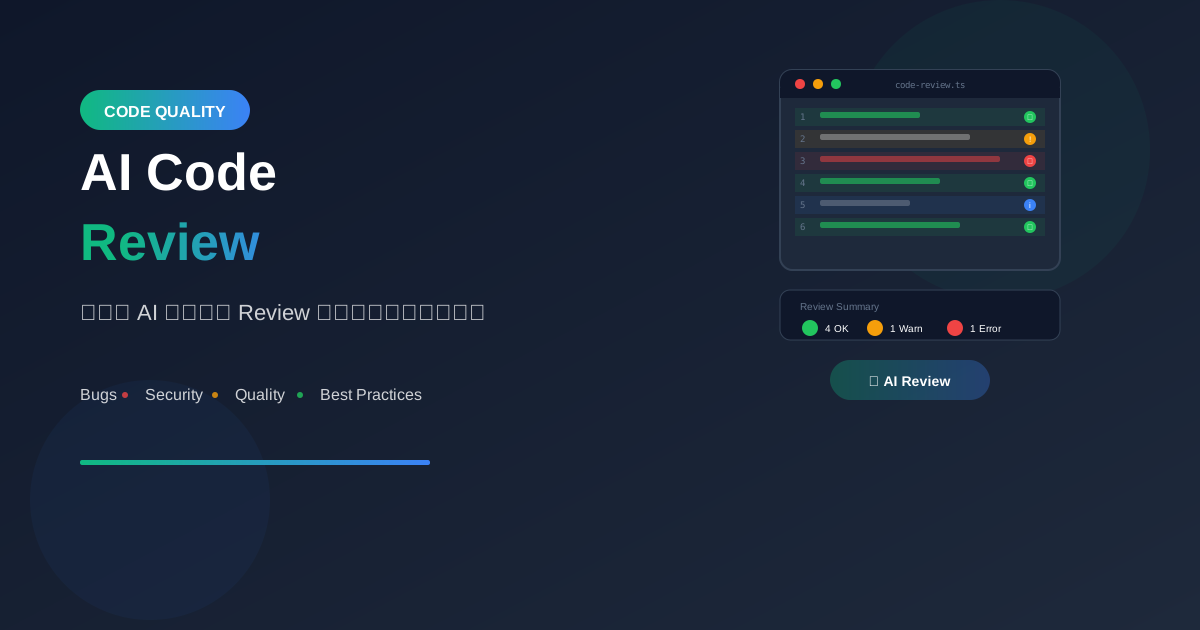
AI Code Review คือการใช้ AI ช่วยตรวจสอบโค้ด หา bugs, security vulnerabilities และแนะนำการปรับปรุง ช่วยให้ code quality ดีขึ้นอย่างมาก
ทำไมต้องใช้ AI Review Code?
ประโยชน์หลัก
1. Speed
   - Review ได้ทันที
   - ไม่ต้องรอ reviewer

2. Consistency
   - ตรวจสอบทุกครั้งเหมือนกัน
   - ไม่มี bias

3. Coverage
   - ไม่พลาด edge cases
   - ตรวจได้ละเอียด

4. Learning
   - ได้เรียนรู้ best practices
   - เข้าใจ why ไม่ใช่แค่ what
AI vs Human Review
AI Review:
✅ Fast และ available 24/7
✅ Consistent standards
✅ ตรวจ pattern-based issues ได้ดี
⚠️ อาจไม่เข้าใจ business context

Human Review:
✅ เข้าใจ context และ intent
✅ ตัดสินใจ trade-offs ได้
✅ Mentoring และ knowledge sharing
⚠️ ช้ากว่า และอาจไม่ consistent

Best Practice: ใช้ทั้งสองร่วมกัน
วิธีใช้ AI Review Code
Basic Prompt Structure
"Review this [language] code for:
- Bugs and potential issues
- Security vulnerabilities
- Performance improvements
- Code style and readability
- Best practices

[paste code here]"
Focused Review
Security Focus:
"Review this code for security vulnerabilities,
especially SQL injection, XSS, and authentication
issues"

Performance Focus:
"Analyze this code for performance bottlenecks
and suggest optimizations"

Readability Focus:
"Review this code for readability and suggest
refactoring to improve maintainability"
Practical Examples
Example 1: Basic Function Review
// โค้ดที่ต้องการ review
function getUserData(userId) {
  const query = "SELECT * FROM users WHERE id = " + userId;
  const result = db.query(query);
  return result;
}
AI Review Results:

🔴 CRITICAL - SQL Injection:
การ concatenate userId โดยตรงเสี่ยงต่อ SQL injection

Fix:
const query = "SELECT * FROM users WHERE id = ?";
const result = db.query(query, [userId]);

🟡 MEDIUM - Select *:
ควรระบุ columns ที่ต้องการแทน SELECT *

🟡 MEDIUM - No Error Handling:
ควรเพิ่ม try-catch และ handle database errors
Example 2: React Component Review
// โค้ดที่ต้องการ review
function UserList({ users }) {
  const [filteredUsers, setFilteredUsers] = useState(users);

  useEffect(() => {
    setFilteredUsers(users);
  }, []);

  return (
    <ul>
      {filteredUsers.map(user => (
        <li>{user.name}</li>
      ))}
    </ul>
  );
}
AI Review Results:

🔴 HIGH - Missing Key Prop:
map() ต้องมี unique key prop

Fix:
<li key={user.id}>{user.name}</li>

🟡 MEDIUM - useEffect Dependency:
useEffect ไม่มี users ใน dependency array
ทำให้ไม่ update เมื่อ props เปลี่ยน

Fix:
useEffect(() => {
  setFilteredUsers(users);
}, [users]);

🟡 MEDIUM - Redundant State:
filteredUsers ซ้ำซ้อนกับ props
ถ้าไม่มี filtering logic ไม่จำเป็นต้องใช้ state
Example 3: API Endpoint Review
# โค้ดที่ต้องการ review
@app.route('/api/user/<id>')
def get_user(id):
    user = User.query.get(id)
    return jsonify({
        'id': user.id,
        'name': user.name,
        'password': user.password,
        'email': user.email
    })
AI Review Results:

🔴 CRITICAL - Password Exposure:
ส่ง password ออก API response!
ต้องลบออกทันที

🔴 HIGH - No Null Check:
ถ้า user not found จะ error

Fix:
user = User.query.get(id)
if not user:
    return jsonify({'error': 'User not found'}), 404

🟡 MEDIUM - No Authentication:
Endpoint ไม่มี auth protection
ใครก็ดึงข้อมูล user ได้

🟢 LOW - Consider Using Serializer:
ควรใช้ serializer/schema แทนการ return dict
Review Checklist
Security Review
✓ Input Validation
  - ตรวจสอบ user input ทุกตัว
  - Sanitize ก่อนใช้งาน

✓ Authentication/Authorization
  - ตรวจสอบสิทธิ์ก่อน access
  - ไม่ expose sensitive data

✓ Injection Prevention
  - SQL injection
  - XSS (Cross-Site Scripting)
  - Command injection

✓ Data Protection
  - ไม่ log sensitive data
  - Encrypt data at rest/transit
Performance Review
✓ Database Queries
  - N+1 query problems
  - Missing indexes
  - Unnecessary data fetching

✓ Memory Usage
  - Memory leaks
  - Large data structures
  - Proper cleanup

✓ Algorithm Efficiency
  - Time complexity
  - Space complexity
  - Unnecessary loops
Code Quality Review
✓ Readability
  - Clear naming
  - Proper comments
  - Consistent formatting

✓ Maintainability
  - Single responsibility
  - DRY (Don't Repeat Yourself)
  - Proper error handling

✓ Testability
  - Dependency injection
  - Pure functions
  - Mockable dependencies
AI Review Tools
ChatGPT/Claude
ใช้โดยตรง:
1. Copy code
2. Paste พร้อม prompt
3. Get review results

Best for:
- Ad-hoc reviews
- Learning และ explanation
- Complex logic review
GitHub Copilot
Inline suggestions:
- Real-time feedback
- Fix suggestions
- Auto-completion

Commands:
/explain - อธิบายโค้ด
/fix - แก้ปัญหา
/tests - สร้าง tests
Cursor IDE
Built-in AI review:
- Select code
- Cmd+K → "review this code"
- Get instant feedback

Features:
- Context-aware
- Codebase understanding
- Inline fixes
Specialized Tools
SonarQube + AI:
- Static analysis
- Security scanning
- Quality gates

CodeClimate:
- Automated review
- Maintainability scores
- Test coverage
Best Practices
1. Give Context
❌ ไม่ดี:
"Review this code"

✅ ดีกว่า:
"This is a payment processing function for
an e-commerce app. Review for security,
especially handling of credit card data"
2. Review in Chunks
❌ ส่งไฟล์ทั้งหมด 1000 บรรทัด

✅ แบ่งเป็นส่วน:
- Function by function
- Module by module
- Focus area by area
3. Ask for Explanations
"Why is this a security issue?"
"Explain the performance impact"
"What's the best practice here and why?"
4. Verify AI Suggestions
AI อาจผิดได้:
- Verify security fixes work
- Test performance improvements
- Check edge cases
- Consider trade-offs
Prompt Templates
General Review
"Review this [language] code:

Context: [describe what the code does]

Focus areas:
1. Security vulnerabilities
2. Performance issues
3. Code quality
4. Best practices for [framework/language]

Rate issues by severity (Critical/High/Medium/Low)
Provide specific fix suggestions

[code here]"
Security Audit
"Perform a security audit on this code:

Check for:
- OWASP Top 10 vulnerabilities
- Authentication/authorization issues
- Data validation problems
- Sensitive data exposure
- Injection vulnerabilities

Provide:
- Risk level (Critical/High/Medium/Low)
- Explanation of the vulnerability
- Recommended fix
- Example of safe code

[code here]"
Refactoring Review
"Review this code for refactoring opportunities:

Consider:
- SOLID principles
- Design patterns
- Code duplication
- Function length and complexity
- Naming conventions

Suggest:
- What to extract
- Better abstractions
- Cleaner patterns

[code here]"
Workflow Integration
Pre-Commit Review
ก่อน commit:
1. Run AI review on changed files
2. Fix critical issues
3. Document known issues
4. Commit with confidence
PR Review Workflow
1. Developer creates PR
2. AI auto-reviews (GitHub Actions)
3. AI posts comments on issues
4. Developer addresses AI feedback
5. Human reviewer does final review
6. Merge
Continuous Review
Set up automated:
- On every push
- Nightly full scan
- Pre-release audit

Track:
- Issue trends
- Code quality score
- Security posture
สรุป
AI Code Review Benefits:
- Speed: ได้ feedback ทันที
- Consistency: มาตรฐานเดียวกันทุกครั้ง
- Coverage: ตรวจได้ครอบคลุม
- Learning: เรียนรู้ best practices
- Quality: โค้ดดีขึ้น
Best Practices:
- ให้ context ที่ชัดเจน
- Review เป็นส่วนๆ
- Verify AI suggestions
- ใช้ร่วมกับ human review
Remember:
- AI เป็น assistant ไม่ใช่ replacement
- ต้อง verify ก่อนใช้
- เรียนรู้จาก feedback
- ปรับปรุงอย่างต่อเนื่อง
อ่านเพิ่มเติม:
เขียนโดย
AI Unlocked Team
สถาบันสอน AI และ Vibe Coding — เชียงใหม่และออนไลน์
AI Unlocked สอน AI และ Vibe Coding มากว่า 15 ปี ผู้เรียนกว่า 1,500 คน โฟกัสลงมือทำจริงด้วย Claude Code, n8n และ AI Agent
บทความในหัวข้อเดียวกัน
Vibe Coding คืออะไร? การเขียนโค้ดด้วย AI ยุคใหม่
ทำความเข้าใจ Vibe Coding วิธีการเขียนโค้ดรูปแบบใหม่ที่ใช้ AI เป็นผู้ช่วย พร้อมเรียนรู้หลักการ ข้อดี และวิธีเริ่มต้นสำหรับนักพัฒนาทุกระดับ
Vibe Coding สำหรับ SaaS MVP — ใน 2 สัปดาห์
สร้าง SaaS MVP ด้วย Vibe Coding ใน 14 วัน — Next.js, Supabase, Stripe, Vercel พร้อม 14-day plan ทีละ step เริ่มขายได้จริง!
MCP (Model Context Protocol) + Agent — สอน Setup
MCP Agent คืออะไร? สอน Setup Model Context Protocol ตั้งแต่ต้น — เชื่อม Claude, Cursor, Continue + สร้าง Custom Server สำหรับธุรกิจ เริ่มใช้วันนี้!