
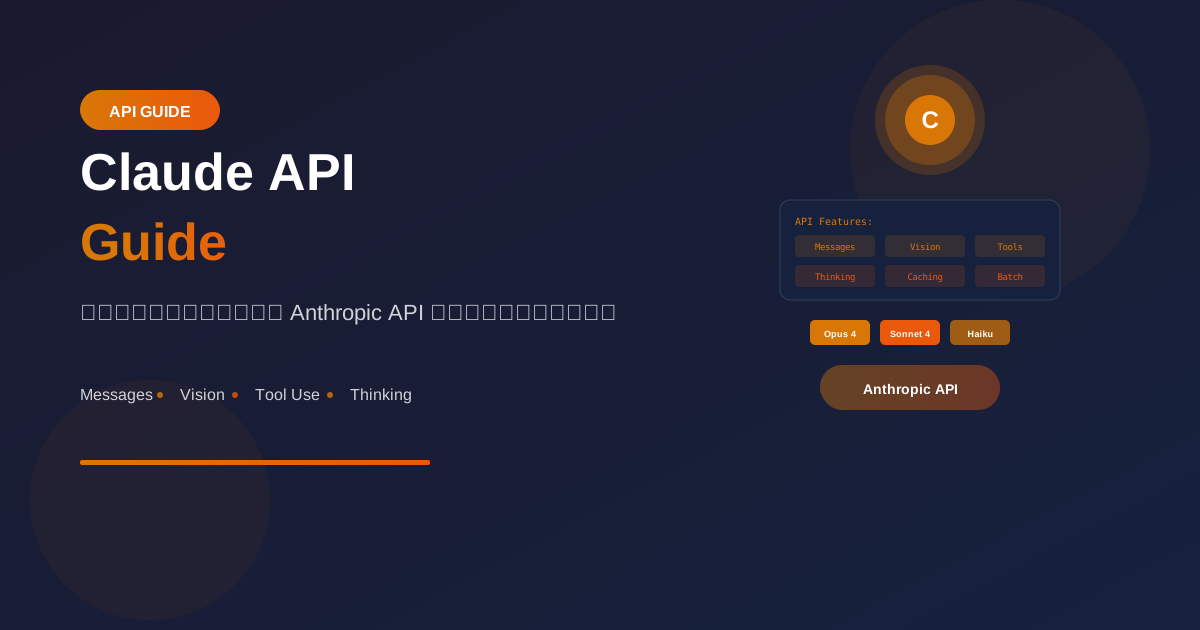
Claude API จาก Anthropic เป็นทางเลือกยอดนิยมสำหรับ AI applications ที่ต้องการความปลอดภัยและ reasoning ที่ดี
Getting Started
API Key Setup
# 1. ไปที่ console.anthropic.com
# 2. สร้าง API key
# 3. Set environment variable

import os
import anthropic

os.environ["ANTHROPIC_API_KEY"] = "sk-ant-..."

# Initialize client
client = anthropic.Anthropic()
Available Models
Claude Opus 4 (claude-opus-4-20250514)
- Most capable
- Complex reasoning
- $15/1M input, $75/1M output

Claude Sonnet 4 (claude-sonnet-4-20250514)
- Best balance
- Fast and capable
- $3/1M input, $15/1M output

Claude 3.5 Haiku (claude-3-5-haiku-20241022)
- Fastest
- Most affordable
- $0.80/1M input, $4/1M output
Messages API
Basic Usage
import anthropic

client = anthropic.Anthropic()

message = client.messages.create(
    model="claude-sonnet-4-20250514",
    max_tokens=1024,
    messages=[
        {"role": "user", "content": "What is Claude?"}
    ]
)

print(message.content[0].text)
System Prompt
message = client.messages.create(
    model="claude-sonnet-4-20250514",
    max_tokens=1024,
    system="You are a helpful Python tutor. Always include code examples.",
    messages=[
        {"role": "user", "content": "Explain decorators"}
    ]
)
Multi-turn Conversation
messages = []

def chat(user_input):
    messages.append({"role": "user", "content": user_input})

    response = client.messages.create(
        model="claude-sonnet-4-20250514",
        max_tokens=1024,
        system="You are a friendly assistant.",
        messages=messages
    )

    assistant_message = response.content[0].text
    messages.append({"role": "assistant", "content": assistant_message})

    return assistant_message

# Usage
print(chat("My name is John"))
print(chat("What's my name?"))  # Claude remembers
Parameters
message = client.messages.create(
    model="claude-sonnet-4-20250514",

    # Required
    max_tokens=1024,
    messages=[...],

    # Optional
    system="System prompt here",

    # Sampling parameters
    temperature=0.7,  # 0-1
    top_p=0.9,
    top_k=40,

    # Stop sequences
    stop_sequences=["\n\nHuman:"],

    # Metadata
    metadata={"user_id": "user-123"}
)
Streaming
Stream Responses
# Stream for real-time output
with client.messages.stream(
    model="claude-sonnet-4-20250514",
    max_tokens=1024,
    messages=[{"role": "user", "content": "Write a story"}]
) as stream:
    for text in stream.text_stream:
        print(text, end="", flush=True)
Async Streaming
import asyncio
from anthropic import AsyncAnthropic

async_client = AsyncAnthropic()

async def stream_chat():
    async with async_client.messages.stream(
        model="claude-sonnet-4-20250514",
        max_tokens=1024,
        messages=[{"role": "user", "content": "Hello!"}]
    ) as stream:
        async for text in stream.text_stream:
            print(text, end="", flush=True)

asyncio.run(stream_chat())
Vision (Image Input)
Analyze Images
import base64

# From URL
message = client.messages.create(
    model="claude-sonnet-4-20250514",
    max_tokens=1024,
    messages=[
        {
            "role": "user",
            "content": [
                {
                    "type": "image",
                    "source": {
                        "type": "url",
                        "url": "https://example.com/image.jpg"
                    }
                },
                {
                    "type": "text",
                    "text": "What's in this image?"
                }
            ]
        }
    ]
)

# From base64
def encode_image(path):
    with open(path, "rb") as f:
        return base64.standard_b64encode(f.read()).decode("utf-8")

message = client.messages.create(
    model="claude-sonnet-4-20250514",
    max_tokens=1024,
    messages=[
        {
            "role": "user",
            "content": [
                {
                    "type": "image",
                    "source": {
                        "type": "base64",
                        "media_type": "image/jpeg",
                        "data": encode_image("photo.jpg")
                    }
                },
                {
                    "type": "text",
                    "text": "Describe this image"
                }
            ]
        }
    ]
)
Multiple Images
message = client.messages.create(
    model="claude-sonnet-4-20250514",
    max_tokens=1024,
    messages=[
        {
            "role": "user",
            "content": [
                {
                    "type": "image",
                    "source": {"type": "url", "url": "image1.jpg"}
                },
                {
                    "type": "image",
                    "source": {"type": "url", "url": "image2.jpg"}
                },
                {
                    "type": "text",
                    "text": "Compare these two images"
                }
            ]
        }
    ]
)
Tool Use (Function Calling)
Define Tools
tools = [
    {
        "name": "get_weather",
        "description": "Get current weather for a location",
        "input_schema": {
            "type": "object",
            "properties": {
                "location": {
                    "type": "string",
                    "description": "City name, e.g., Bangkok"
                },
                "unit": {
                    "type": "string",
                    "enum": ["celsius", "fahrenheit"],
                    "description": "Temperature unit"
                }
            },
            "required": ["location"]
        }
    }
]
Use Tools
# Function implementation
def get_weather(location, unit="celsius"):
    # In real app, call weather API
    return {"temp": 30, "condition": "sunny", "unit": unit}

# Request with tools
response = client.messages.create(
    model="claude-sonnet-4-20250514",
    max_tokens=1024,
    tools=tools,
    messages=[
        {"role": "user", "content": "What's the weather in Bangkok?"}
    ]
)

# Process tool use
for block in response.content:
    if block.type == "tool_use":
        tool_name = block.name
        tool_input = block.input
        tool_use_id = block.id

        # Execute tool
        if tool_name == "get_weather":
            result = get_weather(**tool_input)

        # Send result back
        follow_up = client.messages.create(
            model="claude-sonnet-4-20250514",
            max_tokens=1024,
            tools=tools,
            messages=[
                {"role": "user", "content": "What's the weather in Bangkok?"},
                {"role": "assistant", "content": response.content},
                {
                    "role": "user",
                    "content": [
                        {
                            "type": "tool_result",
                            "tool_use_id": tool_use_id,
                            "content": str(result)
                        }
                    ]
                }
            ]
        )

        print(follow_up.content[0].text)
Extended Thinking
Enable Thinking
# For complex reasoning tasks
response = client.messages.create(
    model="claude-sonnet-4-20250514",
    max_tokens=16000,
    thinking={
        "type": "enabled",
        "budget_tokens": 10000  # Budget for thinking
    },
    messages=[
        {
            "role": "user",
            "content": "Solve this complex math problem..."
        }
    ]
)

# Access thinking and response
for block in response.content:
    if block.type == "thinking":
        print("Thinking:", block.thinking)
    elif block.type == "text":
        print("Response:", block.text)
Prompt Caching
Enable Caching
# Cache system prompt for repeated calls
response = client.messages.create(
    model="claude-sonnet-4-20250514",
    max_tokens=1024,
    system=[
        {
            "type": "text",
            "text": "You are an expert assistant with extensive knowledge...",
            "cache_control": {"type": "ephemeral"}
        }
    ],
    messages=[
        {"role": "user", "content": "Question 1"}
    ]
)

# Check cache usage
print(f"Cache created: {response.usage.cache_creation_input_tokens}")
print(f"Cache read: {response.usage.cache_read_input_tokens}")
Batch Processing
Send Batch Requests
# Create batch of requests
batch = client.batches.create(
    requests=[
        {
            "custom_id": "request-1",
            "params": {
                "model": "claude-sonnet-4-20250514",
                "max_tokens": 1024,
                "messages": [{"role": "user", "content": "Hello"}]
            }
        },
        {
            "custom_id": "request-2",
            "params": {
                "model": "claude-sonnet-4-20250514",
                "max_tokens": 1024,
                "messages": [{"role": "user", "content": "Hi there"}]
            }
        }
    ]
)

# Poll for results
import time

while batch.processing_status != "ended":
    time.sleep(10)
    batch = client.batches.retrieve(batch.id)

# Get results
for result in client.batches.results(batch.id):
    print(f"{result.custom_id}: {result.result.message.content[0].text}")
Error Handling
Robust API Calls
from anthropic import (
    Anthropic,
    APIError,
    RateLimitError,
    APIConnectionError
)
import time

client = Anthropic()

def call_with_retry(messages, max_retries=3):
    for attempt in range(max_retries):
        try:
            response = client.messages.create(
                model="claude-sonnet-4-20250514",
                max_tokens=1024,
                messages=messages
            )
            return response.content[0].text

        except RateLimitError as e:
            wait_time = 2 ** attempt
            print(f"Rate limited. Waiting {wait_time}s...")
            time.sleep(wait_time)

        except APIConnectionError:
            print("Connection error. Retrying...")
            time.sleep(1)

        except APIError as e:
            print(f"API error: {e}")
            raise

    raise Exception("Max retries exceeded")
Best Practices
1. System Prompt Design
# Be clear and specific
system = """You are a technical documentation writer.

Guidelines:
- Write in clear, concise language
- Include code examples when relevant
- Use markdown formatting
- Keep responses focused and organized

Format:
- Use headers for sections
- Use bullet points for lists
- Use code blocks for code"""
2. Token Management
# Claude counts tokens differently
# Use the tokenizer
from anthropic import Anthropic

client = Anthropic()

# Count tokens before sending
token_count = client.count_tokens(
    model="claude-sonnet-4-20250514",
    messages=[{"role": "user", "content": "Hello"}]
)
print(f"Input tokens: {token_count}")
3. Cost Optimization
# Use appropriate model
# - Haiku for simple tasks (cheapest)
# - Sonnet for most tasks (balanced)
# - Opus for complex reasoning (most expensive)

# Use caching for repeated context
# Use batching for bulk processing
สรุป
Claude API Features:
- Messages API: หลักในการใช้งาน
- Vision: วิเคราะห์รูปภาพ
- Tool Use: Function calling
- Extended Thinking: Deep reasoning
- Batching: Bulk processing
Best Practices:
- Design clear system prompts
- Use appropriate model tier
- Enable caching when possible
- Handle errors gracefully
Remember:
- Claude excels at reasoning
- Use tool_use for actions
- Enable thinking for complex tasks
- Monitor costs with batching
อ่านเพิ่มเติม:
เขียนโดย
AI Unlocked Team
สถาบันสอน AI และ Vibe Coding — เชียงใหม่และออนไลน์
AI Unlocked สอน AI และ Vibe Coding มากว่า 15 ปี ผู้เรียนกว่า 1,500 คน โฟกัสลงมือทำจริงด้วย Claude Code, n8n และ AI Agent
บทความในหัวข้อเดียวกัน

เรียน AI 2026 — Complete Roadmap จากศูนย์ถึงโปร
เรียน AI ปี 2026 ไม่รู้จะเริ่มต้นยังไง? อ่าน Roadmap ฉบับสมบูรณ์นี้ ครบทุก Stage พร้อม Track ตามอาชีพ เริ่มได้เลยวันนี้
28/05/2569
เรียน AI ใน 30 วัน — Plan สำหรับคนงานยุ่ง
เรียน AI 30 วัน ได้จริงไหม? Plan วันละ 1 ชม. สำหรับคนทำงานยุ่ง ตั้งแต่ Foundation ถึง Portfolio — เริ่มต้นได้เลยวันนี้ ดู Pricing
14/08/2569
เรียน AI แล้วเปลี่ยนสายงานได้จริงไหม — Real Case Thai
เรียน AI เปลี่ยนสายงานได้จริงในไทยปี 2026 — 4 case จริง timeline realistic และขั้นตอนที่ทำได้เลย เริ่มต้นที่ AI Unlocked
03/08/2569