
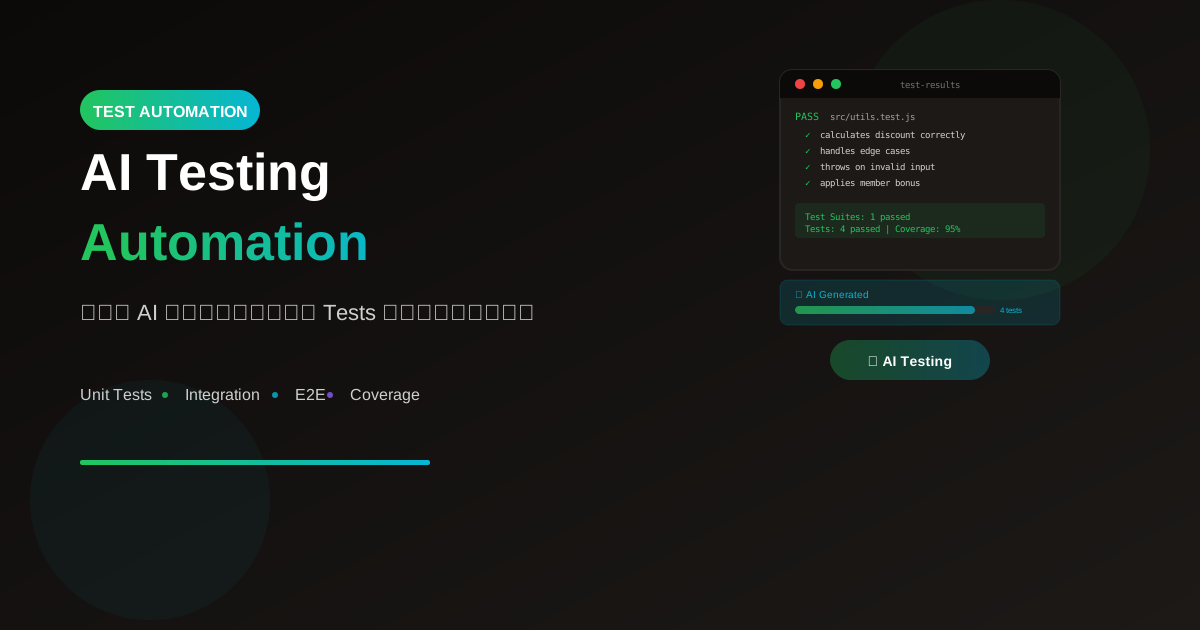
การเขียน tests เป็นงานที่สำคัญแต่ใช้เวลามาก AI สามารถช่วยเขียน tests ได้อัตโนมัติ เพิ่ม coverage และลดเวลาอย่างมาก
ทำไมต้องใช้ AI เขียน Tests?
ปัญหาของการเขียน Tests แบบดั้งเดิม
Traditional Testing:
- ใช้เวลามาก (30-50% ของ dev time)
- น่าเบื่อและ repetitive
- มักถูกข้ามหรือทำไม่ครบ
- ไม่ cover edge cases
AI-Assisted Testing
AI Testing:
✅ สร้าง tests ได้รวดเร็ว
✅ Cover edge cases ได้ครบ
✅ Consistent test patterns
✅ เรียนรู้จาก existing tests
✅ Generate tests สำหรับ legacy code
Types of Tests AI Can Generate
1. Unit Tests
Input → Single function/method
Output → Isolated test cases

AI สร้าง:
- Normal cases
- Edge cases
- Error cases
- Boundary conditions
2. Integration Tests
Input → Multiple components working together
Output → Tests that verify integration

AI สร้าง:
- API endpoint tests
- Database integration tests
- Service interaction tests
3. E2E Tests
Input → User flow description
Output → End-to-end test scripts

AI สร้าง:
- User journey tests
- UI interaction tests
- Full workflow tests
Practical Examples
Example 1: Unit Test Generation
// Function to test
function calculateDiscount(price, discountPercent, memberTier) {
  if (price < 0 || discountPercent < 0) {
    throw new Error('Invalid input');
  }

  let discount = price * (discountPercent / 100);

  if (memberTier === 'gold') {
    discount += price * 0.05;
  } else if (memberTier === 'platinum') {
    discount += price * 0.10;
  }

  return Math.min(discount, price);
}
Prompt:
"Generate comprehensive unit tests for this function.
Include edge cases and error scenarios.
Use Jest testing framework."
// AI Generated Tests
describe('calculateDiscount', () => {
  // Normal cases
  describe('basic discount calculation', () => {
    test('calculates discount correctly', () => {
      expect(calculateDiscount(100, 10, 'standard')).toBe(10);
    });

    test('returns 0 for 0% discount', () => {
      expect(calculateDiscount(100, 0, 'standard')).toBe(0);
    });
  });

  // Member tier bonuses
  describe('member tier bonuses', () => {
    test('adds 5% bonus for gold members', () => {
      expect(calculateDiscount(100, 10, 'gold')).toBe(15);
    });

    test('adds 10% bonus for platinum members', () => {
      expect(calculateDiscount(100, 10, 'platinum')).toBe(20);
    });
  });

  // Edge cases
  describe('edge cases', () => {
    test('caps discount at price', () => {
      expect(calculateDiscount(100, 100, 'platinum')).toBe(100);
    });

    test('handles decimal prices', () => {
      expect(calculateDiscount(99.99, 10, 'standard')).toBeCloseTo(9.999);
    });
  });

  // Error cases
  describe('error handling', () => {
    test('throws on negative price', () => {
      expect(() => calculateDiscount(-100, 10, 'standard'))
        .toThrow('Invalid input');
    });

    test('throws on negative discount', () => {
      expect(() => calculateDiscount(100, -10, 'standard'))
        .toThrow('Invalid input');
    });
  });
});
Example 2: React Component Test
// Component to test
function LoginForm({ onSubmit, isLoading }) {
  const [email, setEmail] = useState('');
  const [password, setPassword] = useState('');
  const [error, setError] = useState('');

  const handleSubmit = (e) => {
    e.preventDefault();
    if (!email || !password) {
      setError('Please fill all fields');
      return;
    }
    onSubmit({ email, password });
  };

  return (
    <form onSubmit={handleSubmit}>
      {error && <div role="alert">{error}</div>}
      <input
        type="email"
        value={email}
        onChange={(e) => setEmail(e.target.value)}
        placeholder="Email"
      />
      <input
        type="password"
        value={password}
        onChange={(e) => setPassword(e.target.value)}
        placeholder="Password"
      />
      <button type="submit" disabled={isLoading}>
        {isLoading ? 'Loading...' : 'Login'}
      </button>
    </form>
  );
}
// AI Generated Tests (React Testing Library)
import { render, screen, fireEvent } from '@testing-library/react';
import userEvent from '@testing-library/user-event';

describe('LoginForm', () => {
  const mockOnSubmit = jest.fn();

  beforeEach(() => {
    mockOnSubmit.mockClear();
  });

  describe('rendering', () => {
    test('renders email and password inputs', () => {
      render(<LoginForm onSubmit={mockOnSubmit} />);

      expect(screen.getByPlaceholderText('Email')).toBeInTheDocument();
      expect(screen.getByPlaceholderText('Password')).toBeInTheDocument();
    });

    test('renders login button', () => {
      render(<LoginForm onSubmit={mockOnSubmit} />);

      expect(screen.getByRole('button', { name: /login/i }))
        .toBeInTheDocument();
    });
  });

  describe('form submission', () => {
    test('calls onSubmit with email and password', async () => {
      render(<LoginForm onSubmit={mockOnSubmit} />);

      await userEvent.type(
        screen.getByPlaceholderText('Email'),
        '[email protected]'
      );
      await userEvent.type(
        screen.getByPlaceholderText('Password'),
        'password123'
      );
      await userEvent.click(screen.getByRole('button'));

      expect(mockOnSubmit).toHaveBeenCalledWith({
        email: '[email protected]',
        password: 'password123'
      });
    });

    test('shows error when fields are empty', async () => {
      render(<LoginForm onSubmit={mockOnSubmit} />);

      await userEvent.click(screen.getByRole('button'));

      expect(screen.getByRole('alert'))
        .toHaveTextContent('Please fill all fields');
      expect(mockOnSubmit).not.toHaveBeenCalled();
    });
  });

  describe('loading state', () => {
    test('disables button when loading', () => {
      render(<LoginForm onSubmit={mockOnSubmit} isLoading={true} />);

      expect(screen.getByRole('button')).toBeDisabled();
    });

    test('shows loading text when loading', () => {
      render(<LoginForm onSubmit={mockOnSubmit} isLoading={true} />);

      expect(screen.getByRole('button')).toHaveTextContent('Loading...');
    });
  });
});
Example 3: API Endpoint Test
// Express endpoint
app.post('/api/users', async (req, res) => {
  const { email, name, password } = req.body;

  if (!email || !name || !password) {
    return res.status(400).json({ error: 'Missing required fields' });
  }

  const existingUser = await User.findOne({ email });
  if (existingUser) {
    return res.status(409).json({ error: 'Email already exists' });
  }

  const user = await User.create({ email, name, password });
  res.status(201).json(user);
});
// AI Generated API Tests (Supertest)
const request = require('supertest');
const app = require('../app');
const User = require('../models/User');

describe('POST /api/users', () => {
  beforeEach(async () => {
    await User.deleteMany({});
  });

  describe('successful creation', () => {
    test('creates user with valid data', async () => {
      const response = await request(app)
        .post('/api/users')
        .send({
          email: '[email protected]',
          name: 'Test User',
          password: 'password123'
        });

      expect(response.status).toBe(201);
      expect(response.body.email).toBe('[email protected]');
      expect(response.body.name).toBe('Test User');
    });

    test('stores user in database', async () => {
      await request(app)
        .post('/api/users')
        .send({
          email: '[email protected]',
          name: 'Test User',
          password: 'password123'
        });

      const user = await User.findOne({ email: '[email protected]' });
      expect(user).toBeTruthy();
    });
  });

  describe('validation errors', () => {
    test('returns 400 when email is missing', async () => {
      const response = await request(app)
        .post('/api/users')
        .send({ name: 'Test', password: 'password' });

      expect(response.status).toBe(400);
      expect(response.body.error).toBe('Missing required fields');
    });

    test('returns 409 when email already exists', async () => {
      await User.create({
        email: '[email protected]',
        name: 'Existing',
        password: 'pass'
      });

      const response = await request(app)
        .post('/api/users')
        .send({
          email: '[email protected]',
          name: 'New User',
          password: 'password'
        });

      expect(response.status).toBe(409);
    });
  });
});
AI Testing Tools
GitHub Copilot
Generate tests inline:
1. Type test function name
2. Copilot suggests test body
3. Tab to accept

Commands:
/tests - Generate tests for selection
Cursor IDE
Built-in test generation:
1. Select code
2. Cmd+K → "Write tests for this"
3. Choose test framework
4. Get comprehensive tests
Specialized Tools
1. Codium AI
   - Test generation
   - Coverage analysis
   - Edge case discovery

2. Tabnine
   - Context-aware test generation
   - Learning from your codebase

3. Qodo (CodiumAI)
   - Automatic test generation
   - PR test suggestions
Prompt Templates
Unit Test Generation
"Generate unit tests for this [language] function:

[paste function]

Requirements:
- Use [testing framework]
- Cover normal cases
- Cover edge cases (empty, null, boundary)
- Cover error scenarios
- Follow AAA pattern (Arrange, Act, Assert)
- Add descriptive test names"
Integration Test Generation
"Generate integration tests for this API endpoint:

[paste endpoint code]

Include tests for:
- Successful responses
- Validation errors
- Authentication/authorization
- Database interactions
- Error handling"
E2E Test Generation
"Generate E2E tests for this user flow:

Flow: [describe user journey]

Steps:
1. [step 1]
2. [step 2]
...

Use [Playwright/Cypress]
Include:
- Happy path
- Error scenarios
- Edge cases"
Best Practices
1. Review Generated Tests
AI สร้าง tests ดี แต่ต้อง review:
- Logic ถูกต้อง?
- Coverage ครบ?
- Assertions เหมาะสม?
- Test isolation ดี?
2. Provide Context
❌ แย่:
"Write tests for this function"

✅ ดี:
"Write Jest unit tests for this
payment calculation function.
Consider: currency rounding,
negative amounts, zero amounts,
and maximum limits"
3. Specify Framework
บอก testing framework ที่ใช้:
- Jest
- Mocha
- Pytest
- JUnit
- React Testing Library
- Playwright
- Cypress
4. Start with Existing Tests
"Here are some existing tests in our codebase:
[paste existing test examples]

Generate similar tests for this new function,
following the same patterns and conventions"
Workflow Integration
TDD with AI
1. Write requirement/spec
2. Ask AI to generate tests first
3. Tests fail (no code yet)
4. Implement code
5. Tests pass
6. Refactor
Test Coverage Boost
1. Run coverage report
2. Identify uncovered code
3. Ask AI to generate tests for gaps
4. Review and integrate
5. Achieve coverage goals
Legacy Code Testing
1. Identify untested legacy code
2. Ask AI to analyze and suggest tests
3. Start with integration tests
4. Add unit tests gradually
5. Refactor with confidence
สรุป
AI Testing Benefits:
- Speed: สร้าง tests เร็วขึ้น 10x
- Coverage: Cover edge cases ที่อาจพลาด
- Consistency: ได้ test patterns ที่สม่ำเสมอ
- Learning: เรียนรู้ test patterns ใหม่ๆ
- Legacy: ช่วยเพิ่ม tests ให้ legacy code
Best Practices:
- Review generated tests
- Provide context และ requirements
- Specify testing framework
- Learn from AI suggestions
Remember:
- AI เป็น starting point
- ต้อง review และปรับปรุง
- เข้าใจ what และ why ของ tests
- ใช้ AI เป็น pair programmer
อ่านเพิ่มเติม:
เขียนโดย
AI Unlocked Team
สถาบันสอน AI และ Vibe Coding — เชียงใหม่และออนไลน์
AI Unlocked สอน AI และ Vibe Coding มากว่า 15 ปี ผู้เรียนกว่า 1,500 คน โฟกัสลงมือทำจริงด้วย Claude Code, n8n และ AI Agent
บทความในหัวข้อเดียวกัน
Vibe Coding คืออะไร? การเขียนโค้ดด้วย AI ยุคใหม่
ทำความเข้าใจ Vibe Coding วิธีการเขียนโค้ดรูปแบบใหม่ที่ใช้ AI เป็นผู้ช่วย พร้อมเรียนรู้หลักการ ข้อดี และวิธีเริ่มต้นสำหรับนักพัฒนาทุกระดับ
Vibe Coding สำหรับ SaaS MVP — ใน 2 สัปดาห์
สร้าง SaaS MVP ด้วย Vibe Coding ใน 14 วัน — Next.js, Supabase, Stripe, Vercel พร้อม 14-day plan ทีละ step เริ่มขายได้จริง!
MCP (Model Context Protocol) + Agent — สอน Setup
MCP Agent คืออะไร? สอน Setup Model Context Protocol ตั้งแต่ต้น — เชื่อม Claude, Cursor, Continue + สร้าง Custom Server สำหรับธุรกิจ เริ่มใช้วันนี้!