
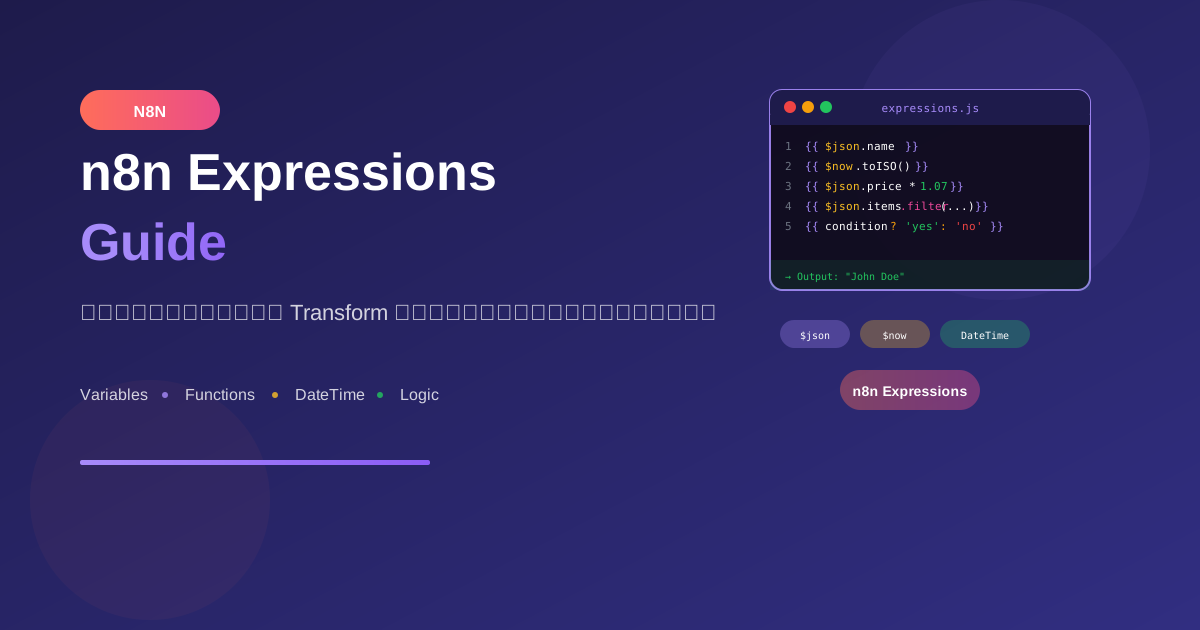
Expressions ใน n8n ช่วยให้คุณจัดการข้อมูลแบบ dynamic ได้อย่างยืดหยุ่น ไม่ว่าจะเป็นการเข้าถึงข้อมูล แปลงรูปแบบ หรือคำนวณค่าต่างๆ
Expression Basics
Syntax พื้นฐาน
// ใช้ {{ }} ครอบ expression
{{ expression }}

// เข้าถึงข้อมูลจาก current item
{{ $json.fieldName }}

// ใช้ JavaScript ได้ทั้งหมด
{{ $json.price * 1.07 }}
Accessing Data
// Current item data
{{ $json.name }}
{{ $json.user.email }}
{{ $json.items[0].name }}

// Data from specific node
{{ $('Node Name').first().json.field }}
{{ $('HTTP Request').last().json.data }}

// All items from a node
{{ $('Node Name').all() }}

// Item at specific index
{{ $('Node Name').item(2).json }}
Built-in Variables
Execution Variables
// Current execution
{{ $execution.id }}
{{ $execution.mode }}  // 'test' or 'production'
{{ $execution.resumeUrl }}

// Workflow info
{{ $workflow.id }}
{{ $workflow.name }}
{{ $workflow.active }}

// Current node
{{ $node.name }}
{{ $node.type }}
Input Data Variables
// Current item
{{ $json }}           // ข้อมูล JSON ของ item ปัจจุบัน
{{ $binary }}         // ข้อมูล binary (ไฟล์)
{{ $itemIndex }}      // index ของ item (0, 1, 2...)
{{ $input.first() }}  // item แรก
{{ $input.last() }}   // item สุดท้าย
{{ $input.all() }}    // ทุก items
Previous Node Data
// เข้าถึง node ก่อนหน้า
{{ $('Previous Node').first().json }}

// เข้าถึง binary data
{{ $('Previous Node').first().binary.data }}

// เข้าถึงทุก items
{{ $('Previous Node').all().map(item => item.json.name) }}
Data Type Functions
String Functions
// ตัดช่องว่าง
{{ $json.name.trim() }}

// ตัวพิมพ์
{{ $json.name.toLowerCase() }}
{{ $json.name.toUpperCase() }}
{{ $json.name.charAt(0).toUpperCase() + $json.name.slice(1) }}

// ค้นหาและแทนที่
{{ $json.text.replace('old', 'new') }}
{{ $json.text.replaceAll('old', 'new') }}

// แยกข้อความ
{{ $json.fullName.split(' ')[0] }}  // First name
{{ $json.email.split('@')[1] }}     // Domain

// ตรวจสอบ
{{ $json.name.includes('test') }}
{{ $json.name.startsWith('Mr') }}
{{ $json.email.endsWith('.com') }}

// ความยาว
{{ $json.name.length }}

// Substring
{{ $json.text.substring(0, 100) }}
{{ $json.text.slice(-10) }}  // 10 ตัวสุดท้าย
Number Functions
// ปัดเศษ
{{ Math.round($json.price) }}
{{ Math.floor($json.price) }}
{{ Math.ceil($json.price) }}
{{ $json.price.toFixed(2) }}

// คำนวณ
{{ Math.abs($json.value) }}
{{ Math.max($json.a, $json.b) }}
{{ Math.min($json.a, $json.b) }}

// Random
{{ Math.random() }}
{{ Math.floor(Math.random() * 100) }}

// Parse
{{ parseInt($json.stringNumber) }}
{{ parseFloat($json.stringDecimal) }}
{{ Number($json.value) || 0 }}
Array Functions
// ความยาว
{{ $json.items.length }}

// เข้าถึง element
{{ $json.items[0] }}
{{ $json.items.at(-1) }}  // ตัวสุดท้าย

// Filter
{{ $json.items.filter(i => i.status === 'active') }}
{{ $json.items.filter(i => i.price > 100) }}

// Map
{{ $json.items.map(i => i.name) }}
{{ $json.items.map(i => i.price * 1.07) }}

// Find
{{ $json.items.find(i => i.id === 123) }}

// Some/Every
{{ $json.items.some(i => i.status === 'error') }}
{{ $json.items.every(i => i.validated) }}

// Reduce
{{ $json.items.reduce((sum, i) => sum + i.price, 0) }}

// Sort
{{ $json.items.sort((a, b) => a.name.localeCompare(b.name)) }}
{{ $json.items.sort((a, b) => b.price - a.price) }}

// Join
{{ $json.items.map(i => i.name).join(', ') }}

// Unique values
{{ [...new Set($json.items.map(i => i.category))] }}
Object Functions
// Keys และ Values
{{ Object.keys($json) }}
{{ Object.values($json.data) }}
{{ Object.entries($json) }}

// Merge objects
{{ { ...$json.defaults, ...$json.custom } }}

// Check property
{{ 'email' in $json }}
{{ $json.hasOwnProperty('name') }}

// Delete property (in Code node)
const obj = { ...$json };
delete obj.sensitiveData;
return obj;
Date/Time Functions
Current Time
// ปัจจุบัน
{{ $now }}                    // Luxon DateTime object
{{ $now.toISO() }}           // 2024-01-15T10:30:00.000Z
{{ $now.toFormat('yyyy-MM-dd') }}
{{ $now.toFormat('dd/MM/yyyy HH:mm') }}

// Today
{{ $today }}                  // เที่ยงคืนของวันนี้
{{ $today.toISO() }}
Date Formatting
// Format patterns
{{ $now.toFormat('yyyy') }}      // 2024
{{ $now.toFormat('MM') }}        // 01
{{ $now.toFormat('dd') }}        // 15
{{ $now.toFormat('HH:mm:ss') }}  // 10:30:00
{{ $now.toFormat('EEEE') }}      // Monday
{{ $now.toFormat('MMMM') }}      // January

// Thai format
{{ $now.toFormat('dd/MM/yyyy') }}     // 15/01/2024
{{ $now.setLocale('th').toFormat('EEEE') }}  // จันทร์
Date Math
// เพิ่ม/ลด
{{ $now.plus({ days: 7 }) }}
{{ $now.plus({ hours: 2 }) }}
{{ $now.minus({ months: 1 }) }}
{{ $now.minus({ years: 1 }) }}

// ตั้งค่า
{{ $now.set({ hour: 9, minute: 0 }) }}
{{ $now.startOf('day') }}
{{ $now.endOf('month') }}

// เปรียบเทียบ
{{ $now.diff($json.createdAt, 'days').days }}
{{ $now > DateTime.fromISO($json.deadline) }}
Parse Date
// จาก ISO string
{{ DateTime.fromISO($json.date) }}

// จาก format เฉพาะ
{{ DateTime.fromFormat($json.date, 'dd/MM/yyyy') }}

// จาก timestamp
{{ DateTime.fromMillis($json.timestamp) }}
{{ DateTime.fromSeconds($json.unixTime) }}
Conditional Logic
Ternary Operator
// if/else แบบย่อ
{{ $json.status === 'active' ? 'ใช้งาน' : 'ปิดใช้งาน' }}

// Nested conditions
{{ $json.score >= 80 ? 'A' : $json.score >= 60 ? 'B' : 'C' }}

// Null check
{{ $json.name ?? 'Unknown' }}
{{ $json.email || '[email protected]' }}
Logical Operators
// AND
{{ $json.isActive && $json.isVerified }}

// OR
{{ $json.email || $json.phone || 'No contact' }}

// NOT
{{ !$json.isDeleted }}

// Nullish coalescing
{{ $json.value ?? 0 }}
Practical Examples
Example 1: Format Customer Data
// Set Node - Format Customer
{
  "fullName": "{{ $json.firstName }} {{ $json.lastName }}",
  "email": "{{ $json.email.toLowerCase().trim() }}",
  "phone": "{{ $json.phone?.replace(/[^0-9]/g, '') }}",
  "isVIP": {{ $json.totalSpent > 10000 }},
  "memberSince": "{{ DateTime.fromISO($json.createdAt).toFormat('dd MMM yyyy') }}",
  "displayStatus": "{{ $json.status === 'active' ? '✅ Active' : '❌ Inactive' }}"
}
Example 2: Calculate Order Summary
// Code Node
const items = $json.items;

const subtotal = items.reduce((sum, item) =>
  sum + (item.price * item.quantity), 0
);
const tax = subtotal * 0.07;
const total = subtotal + tax;

return {
  items: items.length,
  subtotal: subtotal.toFixed(2),
  tax: tax.toFixed(2),
  total: total.toFixed(2),
  currency: 'THB'
};
Example 3: Generate Unique ID
// Expression for unique ID
{{ $now.toMillis() + '-' + Math.random().toString(36).substring(2, 9) }}

// UUID-like
{{ 'xxxxxxxx-xxxx-4xxx-yxxx-xxxxxxxxxxxx'.replace(/[xy]/g, c => {
  const r = Math.random() * 16 | 0;
  return (c === 'x' ? r : (r & 0x3 | 0x8)).toString(16);
}) }}
Example 4: Parse and Transform JSON
// Code Node - Transform API Response
const rawData = $json.response;

return rawData.results.map(item => ({
  id: item.id,
  name: item.properties.Name.title[0]?.plain_text || 'Untitled',
  status: item.properties.Status.select?.name || 'Unknown',
  createdAt: item.created_time,
  updatedAt: item.last_edited_time
}));
Tips & Best Practices
1. Handle Null/Undefined
// ❌ อาจ error ถ้า user เป็น null
{{ $json.user.name }}

// ✅ ปลอดภัย
{{ $json.user?.name ?? 'Guest' }}
{{ $json.user?.email || 'no-email' }}
2. Type Coercion
// แปลงเป็น string
{{ String($json.value) }}

// แปลงเป็น number
{{ Number($json.price) || 0 }}

// แปลงเป็น boolean
{{ Boolean($json.isActive) }}
{{ !!$json.items?.length }}
3. Debug Expressions
// ใช้ Set node เพื่อดูค่า intermediate
{
  "debug_value": {{ $json.complexExpression }},
  "debug_type": "{{ typeof $json.value }}",
  "debug_length": {{ $json.items?.length ?? 'null' }}
}
สรุป
Expression Essentials:
- Access Data:
{{ $json.field }},{{ $('Node').first().json }} - Built-in Variables:
$now,$today,$execution,$workflow - String/Number/Array Functions: JavaScript methods ทั้งหมด
- Date/Time: Luxon library (
$now.toFormat(),$now.plus()) - Conditionals: Ternary
? :,??,||,&&
Remember:
- ใช้
?.และ??เพื่อป้องกัน null errors - ใช้ Code Node สำหรับ logic ที่ซับซ้อน
- Test expressions ใน n8n editor ก่อน run
อ่านเพิ่มเติม:
เขียนโดย
AI Unlocked Team
สถาบันสอน AI และ Vibe Coding — เชียงใหม่และออนไลน์
AI Unlocked สอน AI และ Vibe Coding มากว่า 15 ปี ผู้เรียนกว่า 1,500 คน โฟกัสลงมือทำจริงด้วย Claude Code, n8n และ AI Agent
บทความในหัวข้อเดียวกัน
สร้าง AI Agent — Complete Guide ภาษาไทย 2026
เรียนรู้สร้าง AI Agent ตั้งแต่ศูนย์ ครอบคลุม Claude Agent SDK, OpenAI Agents, LangGraph, n8n พร้อม Use Case ธุรกิจไทย — เริ่มต้นได้วันนี้
AI Agent + Voice — สอนสร้าง Voice Assistant ภาษาไทย
สอนสร้าง AI Voice Agent ภาษาไทยตั้งแต่ STT → LLM → TTS พร้อม tutorial Python และ use case จริง — เริ่มต้นได้วันนี้ที่ aiunlock.co

AI Agent สำหรับ E-commerce — Auto Reply + Order Tracking
AI Agent ecommerce ตอบลูกค้า 24/7 บน Shopee, Lazada, Line, FB — ครอบคลุม order tracking, stock check, escalation พร้อม workflow จริง เริ่มต้นได้เลย