
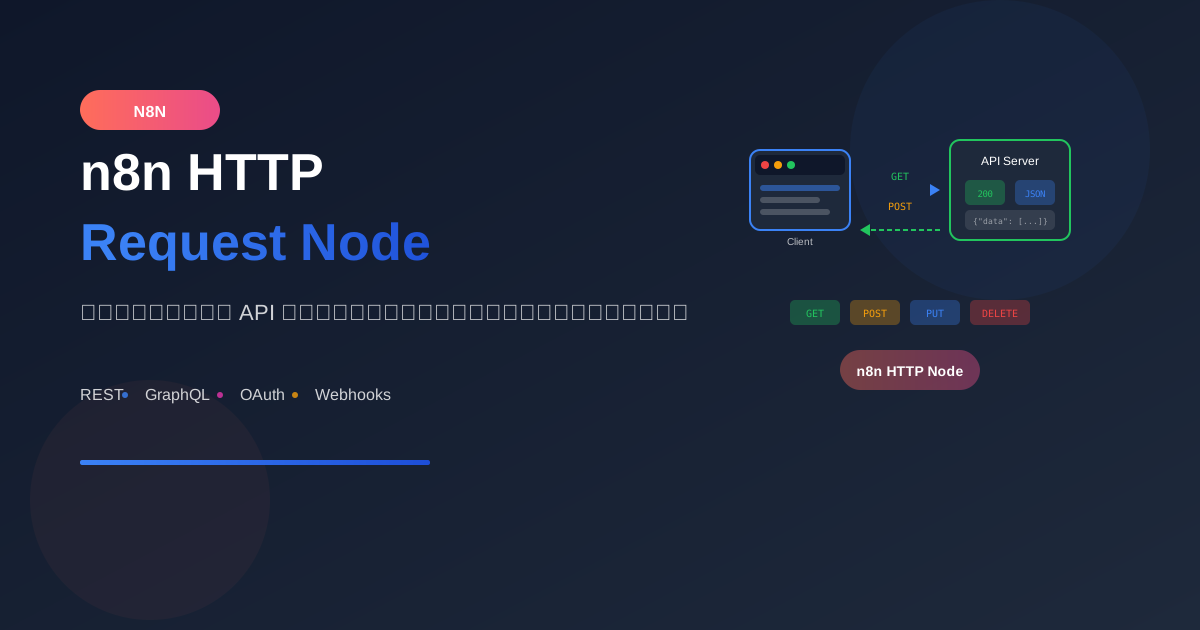
HTTP Request Node เป็น node ที่ใช้บ่อยที่สุดใน n8n สำหรับเชื่อมต่อกับ API ภายนอก ไม่ว่าจะเป็น REST API, GraphQL หรือ Web Services ใดๆ
HTTP Methods
GET - ดึงข้อมูล
ใช้เมื่อ: ต้องการอ่านข้อมูล

Settings:
- Method: GET
- URL: https://api.example.com/users

Query Parameters:
- page: 1
- limit: 10
- status: active
POST - สร้างข้อมูลใหม่
ใช้เมื่อ: ต้องการสร้างข้อมูลใหม่

Settings:
- Method: POST
- URL: https://api.example.com/users
- Body Content Type: JSON

Body:
{
  "name": "John Doe",
  "email": "[email protected]"
}
PUT/PATCH - แก้ไขข้อมูล
PUT - แทนที่ข้อมูลทั้งหมด
PATCH - แก้ไขบางส่วน

Settings:
- Method: PATCH
- URL: https://api.example.com/users/123

Body:
{
  "status": "active"
}
DELETE - ลบข้อมูล
ใช้เมื่อ: ต้องการลบข้อมูล

Settings:
- Method: DELETE
- URL: https://api.example.com/users/123
Authentication Types
1. API Key
Settings:
Authentication → Predefined Credential Type → Generic

Header Auth:
- Name: X-API-Key
- Value: your-api-key

หรือ Query Auth:
- Name: api_key
- Value: your-api-key
2. Bearer Token
Settings:
Authentication → Predefined Credential Type → Header Auth

Header:
- Name: Authorization
- Value: Bearer your-token-here
3. Basic Auth
Settings:
Authentication → Basic Auth

Credentials:
- Username: your-username
- Password: your-password

n8n จะ encode เป็น base64 ให้อัตโนมัติ
4. OAuth2
Settings:
Authentication → OAuth2

Configuration:
- Client ID
- Client Secret
- Access Token URL
- Authorization URL
- Scope

n8n จัดการ token refresh ให้อัตโนมัติ
Headers Configuration
Common Headers
Headers:
- Content-Type: application/json
- Accept: application/json
- User-Agent: n8n-workflow
- X-Request-ID: {{ $now.toMillis() }}
Dynamic Headers
Headers จาก previous node:
- Authorization: Bearer {{ $json.access_token }}
- X-User-ID: {{ $json.userId }}
Request Body Formats
JSON Body
Body Content Type: JSON

{
  "name": "{{ $json.name }}",
  "email": "{{ $json.email }}",
  "metadata": {
    "source": "n8n",
    "timestamp": "{{ $now.toISO() }}"
  }
}
Form Data
Body Content Type: Form-Data Multipart

Form Fields:
- name: {{ $json.name }}
- file: {{ $binary.data }} (binary data)
Form URL Encoded
Body Content Type: Form URL Encoded

Fields:
- grant_type: client_credentials
- client_id: your-client-id
- client_secret: your-secret
Raw Body
Body Content Type: Raw

สำหรับ XML หรือ format อื่นๆ:
<?xml version="1.0"?>
<request>
  <user>{{ $json.name }}</user>
</request>
Response Handling
JSON Response
Response Format: JSON
→ n8n จะ parse เป็น object ให้อัตโนมัติ
→ เข้าถึงได้ผ่าน $json.fieldName
Binary Response (Files)
Response Format: File

Output:
- $binary.data = file content
- $binary.mimeType = content type
- $binary.fileName = file name
Text Response
Response Format: Text
→ ได้เป็น string ใน $json.data
Practical Examples
Example 1: REST API Integration
Workflow: Sync Customers from CRM

1. Schedule Trigger (ทุก 1 ชั่วโมง)

2. HTTP Request - Get Customers
   Method: GET
   URL: https://api.crm.com/v1/customers
   Headers:
   - Authorization: Bearer {{ $credentials.apiToken }}
   Query:
   - updated_after: {{ $now.minus({hours: 1}).toISO() }}

3. Split In Batches
   Batch Size: 50

4. HTTP Request - Update Local DB
   Method: POST
   URL: https://your-api.com/sync
   Body: {{ $json }}
Example 2: File Upload
Workflow: Upload to Cloud Storage

1. Webhook Trigger (รับ file)

2. HTTP Request - Upload to S3
   Method: PUT
   URL: https://bucket.s3.amazonaws.com/{{ $json.filename }}
   Headers:
   - Content-Type: {{ $binary.data.mimeType }}
   - x-amz-acl: public-read
   Body Content Type: Binary
   Binary Property: data
Example 3: GraphQL Query
Workflow: Query GitHub API

1. Manual Trigger

2. HTTP Request - GraphQL
   Method: POST
   URL: https://api.github.com/graphql
   Headers:
   - Authorization: Bearer {{ $credentials.githubToken }}
   Body:
   {
     "query": "query { viewer { login repositories(first: 10) { nodes { name } } } }"
   }
Example 4: Pagination Handling
Workflow: Fetch All Pages

1. Set Node - Initialize
   {
     "page": 1,
     "hasMore": true,
     "allData": []
   }

2. Loop - While hasMore

3. HTTP Request - Get Page
   URL: https://api.example.com/items
   Query:
   - page: {{ $json.page }}
   - limit: 100

4. Code Node - Process Response
   const currentData = $('HTTP Request').first().json.data;
   const existingData = $json.allData;

   return {
     page: $json.page + 1,
     hasMore: currentData.length === 100,
     allData: [...existingData, ...currentData]
   };

5. IF - hasMore?
   → Yes: Loop back
   → No: Continue to next step
Advanced Settings
Timeout Configuration
Settings:
- Timeout: 30000 (30 seconds)

สำหรับ long-running requests:
- Timeout: 300000 (5 minutes)
Retry Logic
Settings:
- Retry On Fail: true
- Wait Between Tries: 2000ms
- Max Tries: 3

เหมาะสำหรับ:
- API ที่ไม่เสถียร
- Rate limiting
- Network issues
Response Handling Options
Settings:

Full Response: true
→ รวม headers, status code

Ignore SSL Issues: true
→ สำหรับ self-signed certificates

Follow Redirects: true
→ ติดตาม 301/302 redirects

Proxy: http://proxy:8080
→ ใช้ proxy server
Batching Requests
Settings:
Batch Size: 10
Batch Interval: 1000ms

→ ส่ง 10 requests พร้อมกัน
→ รอ 1 วินาทีระหว่าง batch
→ หลีกเลี่ยง rate limiting
Error Handling
Check Response Status
1. HTTP Request
   Continue on Fail: true

2. IF Node - Check Status
   Condition: {{ $json.statusCode >= 200 && $json.statusCode < 300 }}

3. Success Path
   → Process response

4. Error Path
   → Log error
   → Retry or notify
Handle Specific Errors
Code Node - Handle Errors:

const response = $input.first().json;

if (response.statusCode === 429) {
  // Rate limited - wait and retry
  return { action: 'retry', delay: 60000 };
}

if (response.statusCode === 401) {
  // Auth error - refresh token
  return { action: 'refresh_token' };
}

if (response.statusCode >= 500) {
  // Server error - notify admin
  return { action: 'notify', error: response.body };
}

return { action: 'success', data: response.body };
Performance Tips
1. Use Caching
ก่อน HTTP Request:
- Check if data exists in cache
- If fresh → use cached data
- If stale → make request + update cache
2. Minimize Payload
Query Parameters:
- fields: id,name,email (เฉพาะที่ต้องการ)
- limit: ตามที่จำเป็น

→ ลด bandwidth และ processing time
3. Parallel Requests
Split data → Process in parallel

SplitInBatches:
- Batch Size: 10
→ ส่ง 10 requests พร้อมกัน
สรุป
HTTP Request Node Essentials:
- Method: เลือกตาม action (GET/POST/PUT/DELETE)
- Authentication: ตั้งค่าให้ถูกต้อง
- Headers: ส่ง content-type และ auth
- Body: format ตามที่ API ต้องการ
- Error Handling: รองรับ failures
Common Use Cases:
- REST API integration
- Webhook callbacks
- File uploads/downloads
- GraphQL queries
- Third-party service sync
อ่านเพิ่มเติม:
เขียนโดย
AI Unlocked Team
สถาบันสอน AI และ Vibe Coding — เชียงใหม่และออนไลน์
AI Unlocked สอน AI และ Vibe Coding มากว่า 15 ปี ผู้เรียนกว่า 1,500 คน โฟกัสลงมือทำจริงด้วย Claude Code, n8n และ AI Agent
บทความในหัวข้อเดียวกัน
สร้าง AI Agent — Complete Guide ภาษาไทย 2026
เรียนรู้สร้าง AI Agent ตั้งแต่ศูนย์ ครอบคลุม Claude Agent SDK, OpenAI Agents, LangGraph, n8n พร้อม Use Case ธุรกิจไทย — เริ่มต้นได้วันนี้
AI Agent + Voice — สอนสร้าง Voice Assistant ภาษาไทย
สอนสร้าง AI Voice Agent ภาษาไทยตั้งแต่ STT → LLM → TTS พร้อม tutorial Python และ use case จริง — เริ่มต้นได้วันนี้ที่ aiunlock.co

AI Agent สำหรับ E-commerce — Auto Reply + Order Tracking
AI Agent ecommerce ตอบลูกค้า 24/7 บน Shopee, Lazada, Line, FB — ครอบคลุม order tracking, stock check, escalation พร้อม workflow จริง เริ่มต้นได้เลย