
Webhook Triggers ใน n8n: ทำความเข้าใจและใช้งาน
Webhook เป็นหนึ่งใน Trigger ที่ทรงพลังที่สุดใน n8n เพราะช่วยให้ระบบภายนอกสามารถ "กระตุ้น" Workflow ของคุณได้แบบ Real-time บทความนี้จะอธิบายทุกอย่างเกี่ยวกับ Webhooks ตั้งแต่พื้นฐานจนถึงการใช้งานขั้นสูง
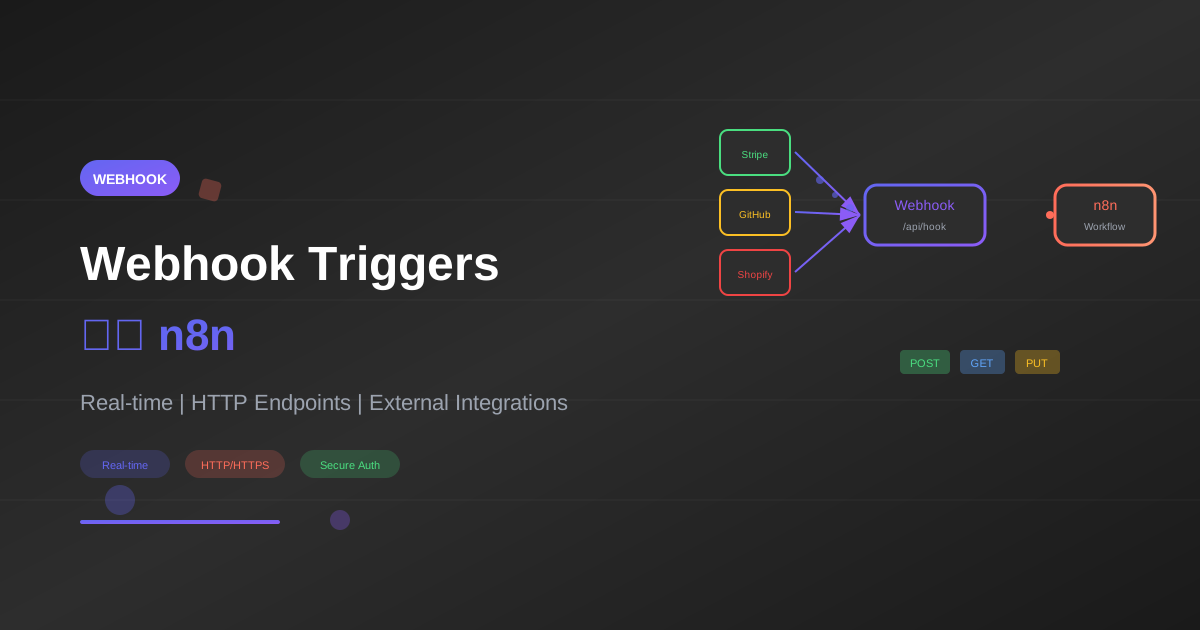
Webhook เป็นหนึ่งใน Trigger ที่ทรงพลังที่สุดใน n8n เพราะช่วยให้ระบบภายนอกสามารถ "กระตุ้น" Workflow ของคุณได้แบบ Real-time บทความนี้จะอธิบายทุกอย่างเกี่ยวกับ Webhooks ตั้งแต่พื้นฐานจนถึงการใช้งานขั้นสูง
Webhook คืออะไร?
Webhook คือ HTTP endpoint ที่รอรับข้อมูลจากแหล่งภายนอก เมื่อมีการส่งข้อมูลมายัง URL นั้น Workflow จะถูกเรียกใช้งานทันที
{
  "webhook_concept": {
    "traditional_api": "คุณต้องถาม (Poll) เพื่อรับข้อมูล",
    "webhook": "ข้อมูลถูกส่งมาหาคุณทันทีที่เกิด Event"
  }
}
ข้อดีของ Webhook
- Real-time: ได้รับข้อมูลทันทีไม่ต้องรอ
- Efficient: ไม่ต้อง Poll ซ้ำๆ
- Scalable: รับมือกับ Traffic ได้ดี
- Universal: ใช้ได้กับทุกระบบที่รองรับ HTTP
Webhook Node ใน n8n
Parameters หลัก
| Parameter | Description | Options |
|---|---|---|
| HTTP Method | วิธีที่รับข้อมูล | GET, POST, HEAD, PUT, PATCH, DELETE |
| Path | URL path หลัง base URL | e.g., /my-webhook |
| Response Mode | วิธีตอบกลับ | Immediately, When Last Node Finishes, Using Response Node |
| Authentication | การยืนยันตัวตน | None, Basic Auth, Header Auth |
สร้าง Webhook แรก
{
  "parameters": {
    "httpMethod": "POST",
    "path": "my-first-webhook",
    "responseMode": "onReceived"
  },
  "name": "Webhook",
  "type": "n8n-nodes-base.webhook",
  "position": [250, 300]
}
URL Format
Production: https://your-n8n-domain.com/webhook/my-first-webhook
Test: https://your-n8n-domain.com/webhook-test/my-first-webhook
HTTP Methods
POST (แนะนำสำหรับส่งข้อมูล)
curl -X POST \
  https://n8n.example.com/webhook/form-data \
  -H "Content-Type: application/json" \
  -d '{"name": "John", "email": "[email protected]"}'
GET (สำหรับ Simple Triggers)
curl "https://n8n.example.com/webhook/trigger?action=start&id=123"
PUT/PATCH (สำหรับ Updates)
curl -X PUT \
  https://n8n.example.com/webhook/update-record \
  -H "Content-Type: application/json" \
  -d '{"id": 123, "status": "completed"}'
Response Modes
1. Immediately
ตอบกลับทันทีก่อน Workflow ทำงานเสร็จ
{
  "use_case": "ไม่ต้องการผลลัพธ์",
  "response": {"success": true},
  "timing": "< 100ms"
}
2. When Last Node Finishes
รอจน Workflow ทำงานเสร็จแล้วค่อยตอบกลับ
{
  "use_case": "ต้องการผลลัพธ์จาก Workflow",
  "response": "ข้อมูลจาก Last Node",
  "timing": "ขึ้นกับ Workflow"
}
3. Using Response Node
ควบคุมการตอบกลับเอง ด้วย "Respond to Webhook" Node
{
  "parameters": {
    "respondWith": "json",
    "responseBody": "={{ JSON.stringify({ processed: true, id: $json.id }) }}",
    "options": {
      "responseCode": 201,
      "responseHeaders": {
        "entries": [
          {"name": "X-Processed-By", "value": "n8n"}
        ]
      }
    }
  },
  "name": "Respond",
  "type": "n8n-nodes-base.respondToWebhook"
}
Workflow Examples
Example 1: Form Submission Handler
{
  "name": "Form Handler",
  "nodes": [
    {
      "parameters": {
        "httpMethod": "POST",
        "path": "contact-form",
        "responseMode": "responseNode"
      },
      "name": "Webhook",
      "type": "n8n-nodes-base.webhook",
      "position": [250, 300]
    },
    {
      "parameters": {
        "conditions": {
          "string": [
            {"value1": "={{ $json.email }}", "operation": "isNotEmpty"},
            {"value1": "={{ $json.message }}", "operation": "isNotEmpty"}
          ]
        }
      },
      "name": "Validate",
      "type": "n8n-nodes-base.if",
      "position": [450, 300]
    },
    {
      "parameters": {
        "operation": "append",
        "documentId": "sheet-id",
        "sheetName": "Contacts"
      },
      "name": "Save",
      "type": "n8n-nodes-base.googleSheets",
      "position": [650, 200]
    },
    {
      "parameters": {
        "respondWith": "json",
        "responseBody": "={{ JSON.stringify({success: true, message: 'Thank you!'}) }}"
      },
      "name": "Success",
      "type": "n8n-nodes-base.respondToWebhook",
      "position": [850, 200]
    },
    {
      "parameters": {
        "respondWith": "json",
        "responseBody": "={{ JSON.stringify({success: false, message: 'Please fill all fields'}) }}",
        "options": {"responseCode": 400}
      },
      "name": "Error",
      "type": "n8n-nodes-base.respondToWebhook",
      "position": [650, 400]
    }
  ]
}
Example 2: Stripe Payment Webhook
{
  "name": "Stripe Payment Handler",
  "nodes": [
    {
      "parameters": {
        "httpMethod": "POST",
        "path": "stripe-webhook",
        "options": {
          "rawBody": true
        }
      },
      "name": "Stripe Webhook",
      "type": "n8n-nodes-base.webhook",
      "position": [250, 300]
    },
    {
      "parameters": {
        "jsCode": "// Verify Stripe signature\nconst stripe = require('stripe');\nconst signature = $input.first().headers['stripe-signature'];\nconst endpointSecret = $env.STRIPE_WEBHOOK_SECRET;\n\ntry {\n  const event = stripe.webhooks.constructEvent(\n    $input.first().rawBody,\n    signature,\n    endpointSecret\n  );\n  return [{json: event}];\n} catch (err) {\n  throw new Error('Webhook signature verification failed');\n}"
      },
      "name": "Verify Signature",
      "type": "n8n-nodes-base.code",
      "position": [450, 300]
    },
    {
      "parameters": {
        "rules": {
          "rules": [
            {"output": 0, "conditions": {"string": [{"value1": "={{ $json.type }}", "value2": "payment_intent.succeeded"}]}},
            {"output": 1, "conditions": {"string": [{"value1": "={{ $json.type }}", "value2": "payment_intent.failed"}]}},
            {"output": 2, "conditions": {"string": [{"value1": "={{ $json.type }}", "value2": "customer.subscription.created"}]}}
          ]
        }
      },
      "name": "Route Event",
      "type": "n8n-nodes-base.switch",
      "position": [650, 300]
    }
  ]
}
Example 3: GitHub Webhook
{
  "name": "GitHub Push Handler",
  "nodes": [
    {
      "parameters": {
        "httpMethod": "POST",
        "path": "github-push",
        "options": {}
      },
      "name": "GitHub Webhook",
      "type": "n8n-nodes-base.webhook",
      "position": [250, 300]
    },
    {
      "parameters": {
        "conditions": {
          "string": [
            {"value1": "={{ $json.ref }}", "operation": "equals", "value2": "refs/heads/main"}
          ]
        }
      },
      "name": "Is Main Branch?",
      "type": "n8n-nodes-base.if",
      "position": [450, 300]
    },
    {
      "parameters": {
        "channel": "#deployments",
        "text": "=*New Push to Main*\n\nRepo: {{ $json.repository.full_name }}\nCommitter: {{ $json.pusher.name }}\nMessage: {{ $json.head_commit.message }}\n\n<{{ $json.compare }}|View Changes>"
      },
      "name": "Notify Slack",
      "type": "n8n-nodes-base.slack",
      "position": [650, 200]
    }
  ]
}
Authentication
Basic Auth
{
  "parameters": {
    "authentication": "basicAuth"
  },
  "credentials": {
    "httpBasicAuth": {
      "user": "webhook_user",
      "password": "secure_password"
    }
  }
}
Test:
curl -u webhook_user:secure_password \
  -X POST https://n8n.example.com/webhook/secure-endpoint
Header Auth
{
  "parameters": {
    "authentication": "headerAuth"
  },
  "credentials": {
    "httpHeaderAuth": {
      "name": "X-API-Key",
      "value": "your-secret-api-key"
    }
  }
}
Test:
curl -H "X-API-Key: your-secret-api-key" \
  -X POST https://n8n.example.com/webhook/api-protected
Custom Validation
// ใน Code Node หลัง Webhook
const secretHeader = $json.headers['x-webhook-secret'];
const expectedSecret = $env.WEBHOOK_SECRET;

if (secretHeader !== expectedSecret) {
  throw new Error('Invalid webhook secret');
}

return $json;
Advanced Techniques
1. Handling Different Content Types
{
  "content_types": {
    "application/json": "Parsed automatically",
    "application/x-www-form-urlencoded": "Parsed as form data",
    "text/plain": "Available as raw body",
    "multipart/form-data": "For file uploads"
  }
}
2. File Upload Handling
{
  "parameters": {
    "httpMethod": "POST",
    "path": "file-upload",
    "options": {
      "binaryData": true
    }
  }
}
3. Query Parameters
// URL: /webhook/search?q=test&page=1
const query = $json.query;
// query.q = "test"
// query.page = "1"
4. Path Parameters
ใช้ Webhook Response Node เพื่อรับ dynamic paths:
{
  "parameters": {
    "path": "users/:userId/orders/:orderId"
  }
}
5. CORS Handling
สำหรับ Frontend applications:
{
  "parameters": {
    "options": {
      "allowedOrigins": "*",
      "responseHeaders": {
        "entries": [
          {"name": "Access-Control-Allow-Origin", "value": "*"},
          {"name": "Access-Control-Allow-Methods", "value": "POST, GET, OPTIONS"},
          {"name": "Access-Control-Allow-Headers", "value": "Content-Type"}
        ]
      }
    }
  }
}
Integration Examples
Integrating with Popular Services
| Service | Webhook Setup | Notes |
|---|---|---|
| Stripe | Dashboard → Webhooks | ต้อง verify signature |
| GitHub | Repo Settings → Webhooks | เลือก events ที่ต้องการ |
| Shopify | Settings → Notifications | มี topics หลายประเภท |
| Typeform | Connect → Webhooks | ส่งเมื่อ form submitted |
| Calendly | Integrations → Webhooks | Event scheduled/cancelled |
Example: Typeform Integration
{
  "typeform_payload_structure": {
    "form_response": {
      "form_id": "abc123",
      "submitted_at": "2025-01-29T10:00:00Z",
      "answers": [
        {"field": {"id": "name"}, "text": "John Doe"},
        {"field": {"id": "email"}, "email": "[email protected]"}
      ]
    }
  }
}
Parsing Typeform Data:
const answers = $json.form_response.answers;
const result = {};

answers.forEach(answer => {
  const fieldId = answer.field.id;
  const value = answer.text || answer.email || answer.number || answer.choice?.label;
  result[fieldId] = value;
});

return [{json: result}];
Testing Webhooks
Method 1: n8n Test URL
- เปิด Webhook Node
- คลิก "Listen for Test Event"
- ส่ง request ไปยัง test URL
Method 2: curl
# Simple POST
curl -X POST \
  https://n8n.example.com/webhook-test/my-webhook \
  -H "Content-Type: application/json" \
  -d '{"test": "data"}'

# With headers
curl -X POST \
  https://n8n.example.com/webhook-test/my-webhook \
  -H "Content-Type: application/json" \
  -H "X-Custom-Header: value" \
  -d '{"key": "value"}'
Method 3: Postman/Insomnia
- สร้าง Request ใหม่
- ใส่ Webhook URL
- เพิ่ม Headers และ Body
- ส่ง Request
Method 4: webhook.site
ใช้ webhook.site เพื่อดู payload ที่ส่งมา
Best Practices
1. Always Validate Input
// ตรวจสอบ required fields
const required = ['email', 'name'];
const missing = required.filter(field => !$json[field]);

if (missing.length > 0) {
  throw new Error(`Missing required fields: ${missing.join(', ')}`);
}
2. Return Appropriate Status Codes
{
  "status_codes": {
    "200": "Success",
    "201": "Created",
    "400": "Bad Request (validation failed)",
    "401": "Unauthorized",
    "404": "Not Found",
    "500": "Internal Server Error"
  }
}
3. Implement Idempotency
// ใช้ unique ID ป้องกันการประมวลผลซ้ำ
const eventId = $json.headers['x-event-id'] || $json.id;

// ตรวจสอบว่าเคยประมวลผลแล้วหรือไม่
// (เก็บ ID ใน database/cache)
4. Handle Timeouts
{
  "timeout_tips": [
    "ตอบกลับ 200 ทันที แล้วประมวลผล async",
    "ใช้ queue สำหรับงานหนัก",
    "ตั้ง timeout ที่เหมาะสมใน n8n settings"
  ]
}
5. Logging และ Monitoring
console.log(`Webhook received: ${$json.event_type}`);
console.log(`Payload: ${JSON.stringify($json.body).substring(0, 500)}`);
Troubleshooting
Common Issues
1. Webhook ไม่ทำงาน
{
  "checklist": [
    "Workflow ต้อง Active",
    "ใช้ Production URL (ไม่ใช่ Test URL)",
    "ตรวจสอบ HTTPS certificate",
    "ตรวจสอบ Firewall/Network"
  ]
}
2. ได้รับ 404
- ตรวจสอบ path ถูกต้อง
- ตรวจสอบ HTTP method ตรงกัน
3. ได้รับ 401/403
- ตรวจสอบ Authentication headers
- ตรวจสอบ Credentials ใน n8n
4. Timeout
- ลด complexity ของ Workflow
- ใช้ "Immediately" response mode
- เพิ่ม timeout ใน settings
อ่านเพิ่มเติม: จัดการ Error ใน n8n
สรุป
Webhook Triggers ใน n8n ช่วยให้คุณ:
- รับข้อมูล Real-time จากทุกระบบ
- เชื่อมต่อกับ Services ยอดนิยม
- ควบคุม Response ได้ตามต้องการ
- สร้าง API Endpoints สำหรับ Applications
ขั้นตอนถัดไป
- Google Sheets: Automate Google Sheets
- Telegram Bot: สร้าง Telegram Bot
- Error Handling: จัดการ Error
- Advanced: 5 Advanced Workflows
พร้อมสร้าง Webhook Workflows แล้วหรือยัง?
ติดตามบทความเพิ่มเติมที่ AI Unlocked หรือติดต่อทีมงานเพื่อรับคำปรึกษา
เขียนโดย
AI Unlocked Team
สถาบันสอน AI และ Vibe Coding — เชียงใหม่และออนไลน์
AI Unlocked สอน AI และ Vibe Coding มากว่า 15 ปี ผู้เรียนกว่า 1,500 คน โฟกัสลงมือทำจริงด้วย Claude Code, n8n และ AI Agent
บทความในหัวข้อเดียวกัน
สร้าง AI Agent — Complete Guide ภาษาไทย 2026
เรียนรู้สร้าง AI Agent ตั้งแต่ศูนย์ ครอบคลุม Claude Agent SDK, OpenAI Agents, LangGraph, n8n พร้อม Use Case ธุรกิจไทย — เริ่มต้นได้วันนี้
AI Agent + Voice — สอนสร้าง Voice Assistant ภาษาไทย
สอนสร้าง AI Voice Agent ภาษาไทยตั้งแต่ STT → LLM → TTS พร้อม tutorial Python และ use case จริง — เริ่มต้นได้วันนี้ที่ aiunlock.co
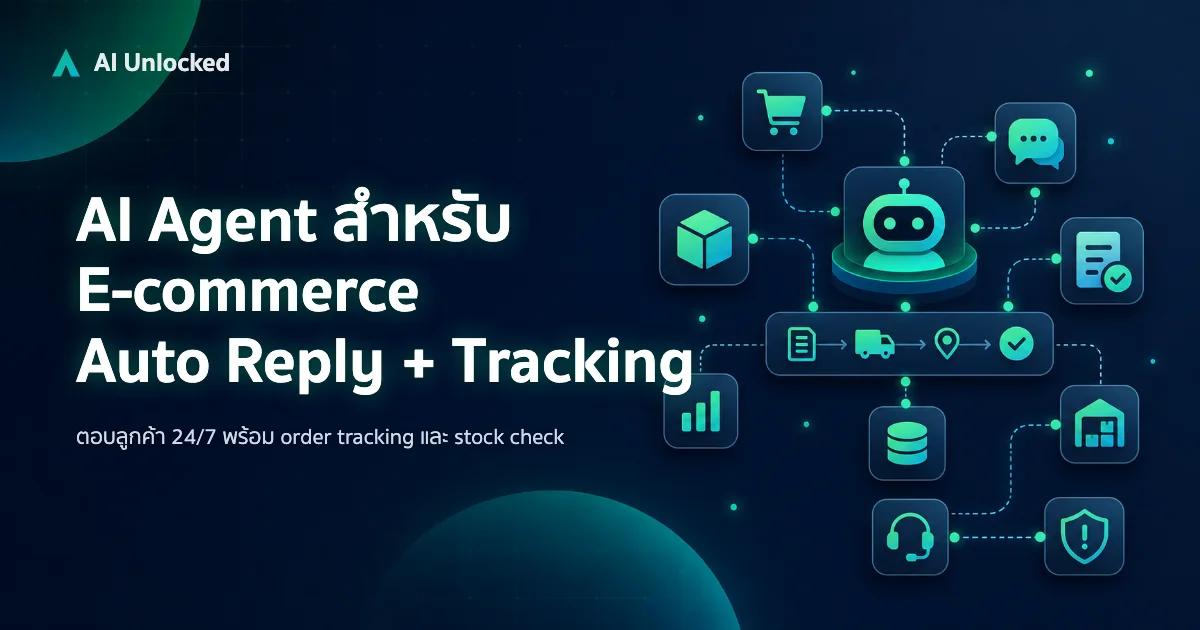
AI Agent สำหรับ E-commerce — Auto Reply + Order Tracking
AI Agent ecommerce ตอบลูกค้า 24/7 บน Shopee, Lazada, Line, FB — ครอบคลุม order tracking, stock check, escalation พร้อม workflow จริง เริ่มต้นได้เลย